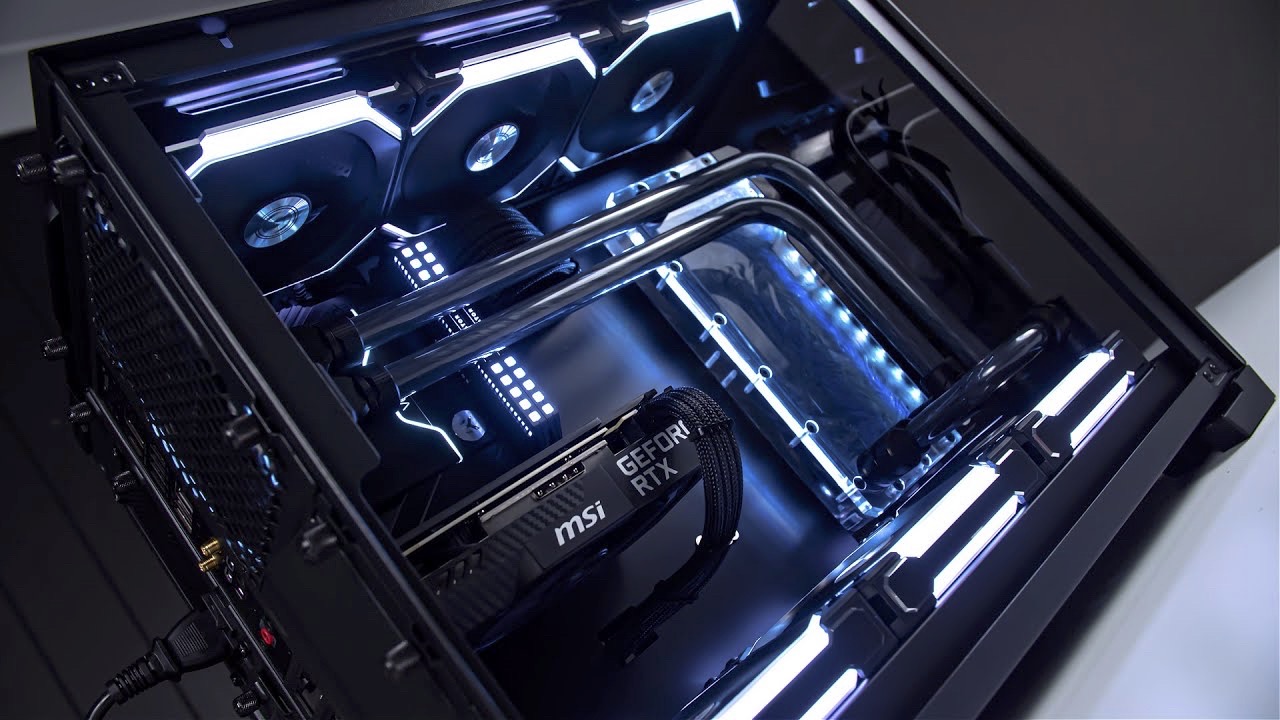
My Intel i7-8700K and RTX 3080 have served me incredibly well. For years this setup has handled everything I’ve thrown at it, but seven years on the cracks are starting to show. Newer titles are pushing CPU performance harder, memory standards have moved on, and even cooling has evolved to free up space and improve aesthetics.
I’m not scrapping everything — my Fractal Design Meshify 2 case is staying. It has excellent airflow, radiator support, and plenty of room for upgrades. My Corsair RM850x PSU is also sticking around, since it still delivers reliable, efficient power for my build. My ROG STRIX RTX 3080 10G, DDR4 16 GB, and a mix of SSDs (Samsung 970 Evo, 980, 860 Evo, 870 QVO) are all still in play. The Noctua NH-D15 has been superb, but I want a change in this build (aesthetics and clearance). The heart of the system — CPU, motherboard, memory, cooler — is ready for a refresh.
I’ll be including links to the components I’m considering. As an Amazon Associate I earn from qualifying purchases. Using these links helps support the blog at no extra cost to you.
Choosing the Right CPU
At the heart of this upgrade is the CPU. My 8700K has served me well, but with modern games demanding more cores, faster clocks, and stronger cache, it’s time to move on. This is the single biggest decision in the build, because it shapes not only performance today but also the upgrade path for years to come.
I narrowed my choices down to a shortlist from both Intel and AMD. Each comes with its own strengths, weaknesses, and future-proofing trade-offs.
⸻
Intel Options
The 14700K is one of Intel’s most balanced gaming chips. It delivers excellent single-core performance and plenty of multi-core power without straying into i9 territory. It’s a safe, proven option that fits well with a GPU like my RTX 3080. The downside is heat — under turbo it can pull a lot of power and needs strong cooling.
Intel’s top mainstream chip is still a monster, offering the highest clocks and multi-core grunt. It’s brilliant if you need raw power, but it’s overkill for gaming alone. It also runs hot and power-hungry, which makes it less appealing unless you want headroom for workloads beyond games.
This is part of Intel’s newer Core Ultra line. It brings efficiency improvements, AI-focused features, and a more forward-looking architecture. It performs well, but it doesn’t match AMD’s cache-heavy CPUs in pure gaming. It’s an interesting pick if you want to try Intel’s latest direction without going all-in on an i9.
The flagship Core Ultra offers maximum cores, features, and efficiency claims compared to older Intel designs. It’s more than enough for gaming, but much like the 14900K, it feels excessive unless you’re also using the system for heavy workloads.
⸻
AMD Options
This chip has been a gamer favourite thanks to its 3D V-Cache. It consistently delivers some of the best gaming performance per watt and remains one of the strongest options for anyone building purely for games.
AMD’s current gaming king. It builds on the success of the 7800X3D with higher clocks and efficiency, giving the best frame rates in many modern titles. It comes at a premium price, but if gaming is your top priority, it’s arguably the strongest pick right now.
A more standard Zen 5 chip, the 9700X delivers solid gaming performance without the added cost of 3D V-Cache. It won’t top the charts in cache-sensitive titles, but it’s efficient, affordable, and still very fast.
The budget-friendly option. With six cores and strong efficiency, it’s a great entry point into the AM5 platform. It handles modern gaming well but offers less headroom long-term compared to the eight-core options.
⸻
My Take
For a gaming-only build like mine, the AMD X3D chips stand out. The 7800X3D is exceptional value, while the 9800X3D leads the pack in performance. On the Intel side, the 14700K makes the most sense — powerful, proven, and mature — though the Core Ultra range is tempting if you want Intel’s newest platform features.
This is where the decision becomes less about raw numbers and more about priorities: do you want the very best gaming performance today, a balanced all-rounder, or to back a new platform for the future?
Motherboard: Choosing the Right Foundation
The motherboard doesn’t directly boost frame rates, but it sets the stage for everything else. It determines how stable the system is, how much you can expand in the future, and how smooth the building process will be. For Intel I’m looking at Z790 and B760, while for AMD the options are X870 or X870E at the high end and B650 for a more balanced approach.
⸻
Intel: Z790 vs B760
Z790 is Intel’s flagship mainstream chipset. It gives you the most PCIe lanes, the richest USB options, and the strongest VRMs. That makes it the safest choice if you’re planning to pair it with a high-end CPU like a Core i9 or if you want to overclock. Z790 boards also tend to include more M.2 slots, better memory overclocking support, and nicer quality-of-life touches like debug LEDs and BIOS flashback.
B760 is Intel’s mid-range chipset. The biggest difference is that B760 does not allow CPU overclocking. You can still use fast DDR5 memory, and many boards have solid VRMs, but you won’t be able to push CPU multipliers. You’ll also get fewer PCIe lanes and USB ports compared to Z790, and generally fewer premium extras. For a gaming system with a Core i7 or even a locked i9, this often doesn’t matter — you still get full performance out of the CPU at stock settings.
The bottom line is simple: if you want to overclock or run a top-tier CPU at its maximum potential, Z790 is the way to go. If you’re focused on gaming and plan to run your chip at stock, B760 offers great value while still delivering the stability and performance you need.
⸻
AMD: X870(E) vs B650
On the AMD side, X870 and X870E are the new high-end chipsets. The “E” stands for Extreme, and that’s exactly what it means in practice.
- X870E boards guarantee PCIe 5.0 support for both the GPU slot and at least one M.2 slot. They are built for enthusiasts who want the full AM5 experience, and they usually add other premium features like USB4 and Wi-Fi 7.
- X870 boards without the “E” still offer strong performance and features, but they aren’t required to provide PCIe 5.0 on both GPU and storage. It depends more on the manufacturer’s design choices.
B650 is the more affordable option, but it’s not stripped down. Many B650 boards include one PCIe 5.0 M.2 slot, plenty of PCIe 4.0 lanes, and VRMs good enough for Ryzen 7 chips. For gaming, that’s usually all you’ll ever need.
So the key takeaway: E means guaranteed PCIe 5.0 across both GPU and storage. If you want maximum future-proofing, X870E is the safe bet. If you’re happy with one Gen5 SSD slot and don’t need every high-end extra, B650 or standard X870 boards give you better value.
Memory: Capacity, Speed, and Latency Explained
RAM doesn’t boost your frame rates as much as a CPU or GPU, but it shapes how smooth your system feels. With DDR5 now firmly established, there are three things worth knowing: capacity, speed, and CAS latency (CL).
Capacity
For years, 16 GB was the standard for gaming, but in 2025 that’s the bare minimum. Modern games regularly push past 16 GB on their own, and if you’re running a browser, Discord, or other apps in the background, you’ll quickly run out.
- 32 GB is the sweet spot for gaming. It gives you headroom today and keeps you safe for the next few years.
- 64 GB is only worth it if you do heavy multitasking, content creation, or very specialised workloads. For gaming, it’s wasted money.
Speed
DDR5 speeds have risen quickly, but there’s a point where the value curve flattens out. You can always buy faster kits, but the cost climbs dramatically for very small gains.
- AMD Ryzen 7000/9000: The best balance is DDR5-6000. That’s the highest speed that runs in sync with AMD’s Infinity Fabric, which keeps latency low and stability high. Anything above that forces the memory controller to switch to a less efficient mode, giving little to no real benefit.
- Intel 13th/14th gen and Core Ultra: Intel’s memory controller is more flexible and can run faster kits like 6400, 6600, or even 7200 MT/s. But in terms of value, DDR5-6000 CL30 still hits the sweet spot. Performance gains above 6400 are marginal in gaming, while prices increase sharply the higher you go.
CAS Latency (CL)
CAS latency is the number of cycles the RAM takes to respond to a request. Lower is better, but you need to look at it alongside speed. For example, DDR5-6000 CL30 is noticeably faster than DDR5-6000 CL40. On Intel, slightly looser timings aren’t as punishing, but on AMD the combination of speed and latency matters a lot more.
The Sweet Spot in 2025
For both AMD and Intel, DDR5-6000 CL30 is the best balance of speed, stability, and cost. It delivers excellent gaming performance without overspending. Yes, you can push into higher speeds on Intel, but the extra cost quickly outweighs the tiny real-world benefits. For most builds, that money is better spent elsewhere.
My Take
For this build, 32 GB of DDR5-6000 CL30 is the clear choice. It hits the sweet spot for both platforms, delivers smooth performance in modern games, and avoids the trap of chasing extreme high-end kits that look great on paper but make little difference once you’re actually playing.
Storage: Fast Enough vs Future-Proof
Storage is one of those areas where the numbers keep climbing, but the real-world benefits don’t always keep pace. For this build, I’m carrying over all of my existing drives:
- Samsung 970 Evo (NVMe Gen3)
- Samsung 980 Pro (NVMe Gen4)
- Samsung 860 Evo (2.5” SATA SSD) — my system drive until now
- Samsung 870 QVO (2.5” SATA SSD) — used mainly for games where speed isn’t critical
This mix has served me really well. Boot times are already quick, games load fast, and I haven’t hit any bottlenecks that would justify replacing everything.
PCIe 4.0: The Current Sweet Spot
Right now, PCIe 4.0 NVMe drives are the clear value leaders. They’re widely available, very mature, and offer speeds that are already far beyond what games actually demand. For gaming and day-to-day use, they feel just as fast as anything newer. The best part is that Gen4 drives are regularly discounted during events like Prime Day or Black Friday, making them one of the best price-to-performance buys in a modern build.
PCIe 5.0: Nice to Have, Not Need to Have
PCIe 5.0 NVMe drives are impressive on paper, with sequential speeds that double what Gen4 offers. But for gaming, the difference just isn’t there. Windows boots in seconds, games load instantly, and asset streaming is already smooth on Gen4. Paying the premium for Gen5 just to use it as a boot drive makes no sense right now.
That doesn’t mean Gen5 is pointless. Having a motherboard that supports it is great — it means the option is there if prices fall or if future workloads actually take advantage of it. But today, Gen5 is more about bragging rights than practical benefit, and it often comes with higher heat output and bulkier cooling requirements on the drives themselves.
My Plan
For now, I’m keeping my current mix of NVMe and 2.5” SSDs, with the 970 Evo and 980 handling the heavy lifting. When I do add more storage, it’ll almost certainly be a PCIe 4.0 NVMe picked up during a big sale. I’ll only look at PCIe 5.0 once prices come down and it offers real-world benefits for gaming — until then, PCIe 4 is the true sweet spot for performance per yen.
Cooling: Moving On from Air to AIO
My Noctua NH-D15 has been a legend — it completely changed my view of air cooling and has kept my 8700K cool and quiet for years. For this build, I did take a serious look at the latest generation of high-end air coolers, but I’ve decided to move to a 360 mm AIO instead.
Air Coolers I Considered
- Thermalright Peerless Assassin 120 — A brilliant value option, slimmer than the NH-D15 but still punching far above its price class.
- Noctua NH-D15 G2 — The successor to my current cooler. It improves on the original with better fans, more fin density, and improved RAM clearance in single-fan mode. Still the king of air cooling, but also still a giant dual-tower that dominates the case.
- be quiet! Dark Rock 5 — A quieter, more understated alternative with solid thermal performance and a stealthy design.
If I were sticking with air, one of these three would be my pick. But my priorities have shifted.
Why I’m Going with an AIO
This time I want a cleaner-looking build with more space around the CPU socket, better RAM clearance, and the ability to actually see the rest of my hardware. A 360 mm AIO moves the bulk away from the CPU area and gives me extra thermal headroom for future CPUs, especially the hotter Intel options.
The three I looked at are:
- Corsair iCUE Link TITAN 360 — Strong performance, polished software integration, and plenty of RGB if you want it.
- Arctic Liquid Freezer III 360 — One of the most efficient AIOs on the market, with an excellent pump design and cooling power. The only drawback is its thickness — it’s much bulkier than most other 360 mm units, which can be a limiting factor depending on your case layout.
- NZXT Kraken Elite 360 — A stylish option with a beautiful LCD pump block and competitive cooling, though the high price is as much about aesthetics as raw performance.
The Trade-Off with AIOs
While AIOs give better aesthetics and sustained cooling, they also come with different risks compared to air cooling. An air cooler has no moving parts beyond fans, which can be replaced easily and cheaply. AIOs add a pump, sealed liquid, and tubing — which means more points of potential failure. Modern AIOs are very reliable, but they generally won’t last as long as a top-tier air cooler like the NH-D15. When the pump eventually fails, the entire unit usually has to be replaced.
That’s the trade-off I’m accepting: slightly higher risk and a shorter lifespan in exchange for a cleaner build and more cooling headroom.
Understanding PSU Types and Features
For readers who might not be familiar with all the PSU jargon, here’s what really matters when choosing one:
- WattageThe most obvious spec. It’s the maximum power the PSU can deliver. Too low and your system won’t be stable. Too high and you’re paying for unused capacity. For gaming rigs with a single high-end GPU, 750–850 W is the sweet spot in 2025.
- Modularity
- Non-modular: All cables are fixed. Cheap but messy, since you can’t remove unused cables.
- Semi-modular: Some cables (like the motherboard and CPU) are fixed, while extras (PCIe, SATA) can be added or removed.
- Fully modular: Every cable is detachable, which makes cable management and custom sleeved cable sets much easier.The RM850x is fully modular, and that’s one of the reasons it has aged so well.
- Connector OrientationSome newer PSUs (like Corsair’s Shift models) have the connectors on the side rather than the back. This makes cable routing cleaner in modern cases where the PSU shroud and cable channels are designed around side-access. It’s not essential, but it’s a nice quality-of-life feature.
- Efficiency RatingMeasured by the 80 Plus certification (Bronze, Gold, Platinum, Titanium). Higher efficiency means less wasted power and heat. For a gaming PC, 80 Plus Gold is the sweet spot — it’s efficient, reliable, and affordable. The RM850x is Gold-rated and remains a rock-solid unit.
- ATX Standards (2.0, 3.0, 3.1)The latest PSUs support ATX 3.0 and 3.1, which include the new 12VHPWR connector for modern GPUs. Since I’m on an RTX 3080, this isn’t essential yet, but it’s something to keep in mind if upgrading to an RTX 4080/4090 or future generations. Adapters exist, but native support is cleaner.
My Take
For this build, I’m sticking with the RM850x. It’s efficient, fully modular, and has plenty of power for my system. Jumping to 1000 W would only add cost without real benefit right now. When I eventually upgrade to a higher-end GPU that really demands it, then I’ll look at a new ATX 3.0 or 3.1 unit — preferably with side connectors for cleaner cable management.
GPU: Planning the Next Upgrade
I’m not chasing the flagship this time — the RTX 4090 is amazing, but the price is insane and the power draw excessive. My RTX 3080 still performs well at 1440p and even 4K in many titles, so I’ll keep it for now. That said, I am looking ahead to what might replace it in the next year or two.
Nvidia Options
- RTX 5070 Ti: Expected to be one of the best value picks in the new lineup, offering high-end performance without breaking the bank.
- RTX 5080: Positioned as the step-down from the flagship, offering much of the power at a lower (but still premium) price.
AMD Options
- RX 9070 XT: AMD’s next-gen high-end card, expected to compete with Nvidia’s 5080 in performance but typically at a better price-to-performance ratio.
- RX 7800 XT: A current-gen option that still offers fantastic 1440p and solid 4K performance at a reasonable price.
Performance, Power, and Price
Nvidia continues to dominate ray tracing and has DLSS 3 frame generation, while AMD offers more VRAM for the money and tends to use less power. Both have strengths, but value is shifting — AMD is winning more gamers over with competitive pricing, while Nvidia leans heavily on its software ecosystem.
My Take
For now, my 3080 is fine. When it comes time to upgrade, I’ll weigh the RTX 5070 Ti or 5080 against AMD’s RX 9070 XT. Unless Nvidia’s pricing improves, AMD might have the better value play this generation.
Conclusion: Laying the Groundwork
This upgrade isn’t about chasing the absolute bleeding edge — it’s about balance. By moving to DDR5, choosing a modern CPU and board, and switching to an AIO cooler, I’ll set myself up for years of smooth gaming without overspending on parts that don’t deliver real-world benefits.
I’m keeping what still works: the PSU, case, GPU, and storage. I’m upgrading what matters most: CPU, motherboard, memory, and cooling. And I’m leaving the GPU upgrade open for the next year or two when it makes sense.
In the next post, I’ll share the exact parts list I’ve chosen and walk through how it all comes together inside the Meshify 2.
Leave a Reply