Tag: gaming

  • Future-Proofing My PC in 2025: White Build with Ryzen 7 7800X3D & Corsair Gear

    Future-Proofing My PC in 2025: White Build with Ryzen 7 7800X3D & Corsair Gear

    Disclosure: As an Amazon Associate I earn from qualifying purchases. Links to products in this article may be affiliate links, which help support the site at no extra cost to you.

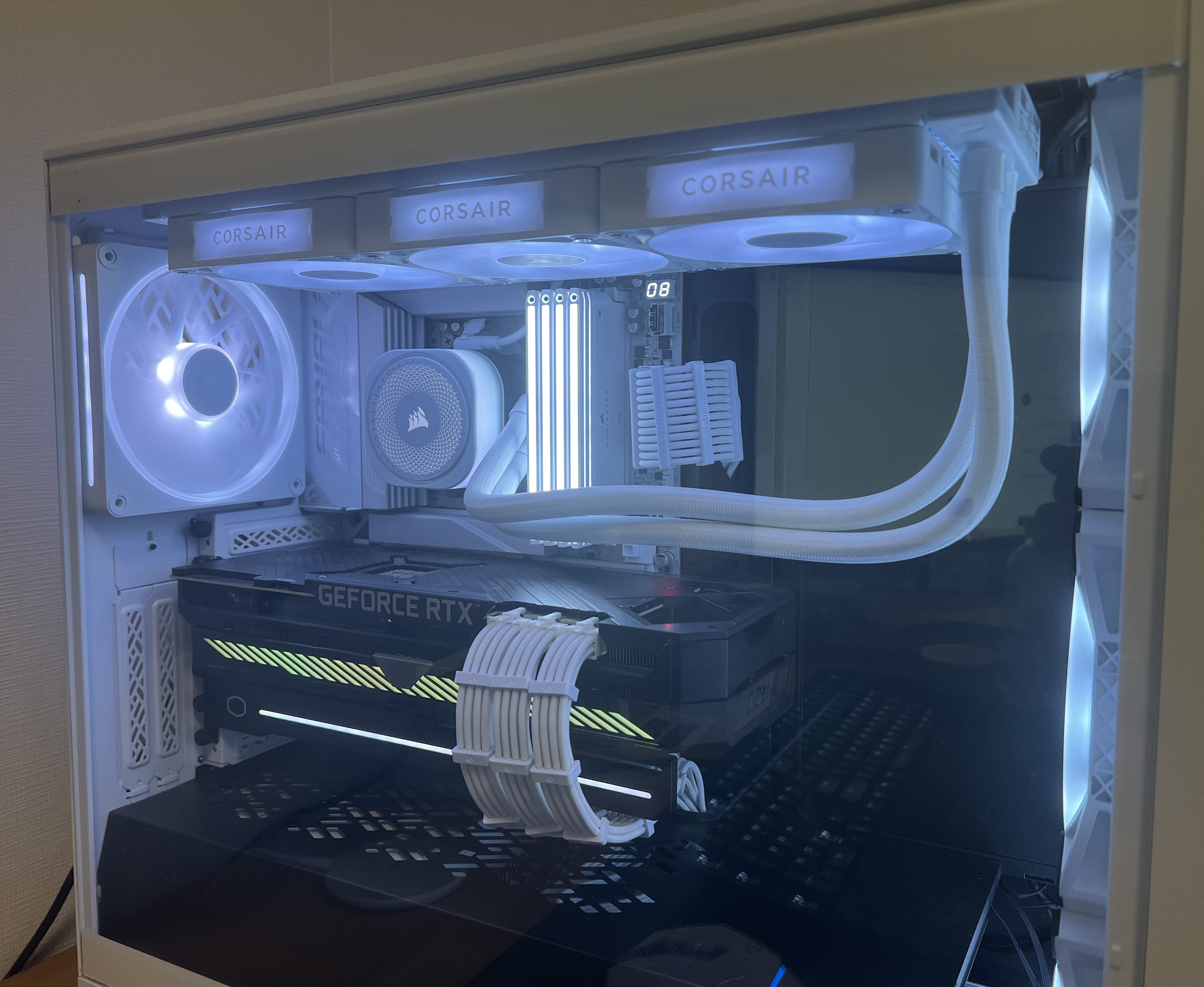
    My Intel i7-8700K and RTX 3080 have served me incredibly well. For years this setup has handled everything I’ve thrown at it, but seven years on the cracks are starting to show. Newer titles are pushing CPU performance harder, memory standards have moved on, and even cooling has evolved to free up space and improve aesthetics.

    I’m not scrapping everything — my Fractal Design Meshify 2 case is staying. It has excellent airflow, radiator support, and plenty of room for upgrades. My Corsair RM1000x SHIFT PSU now powers the build, replacing my older RM850x. I also decided to keep my ROG STRIX RTX 3080 10G, my SSDs, and add in new fans. The heart of the system — CPU, motherboard, memory, cooler — is where the biggest changes happened.


    CPU – Ryzen 7 7800X3D (Best Value Choice)

    When it came to the CPU, my shortlist was between AMD’s 7800X3D and the 9800X3D. On paper, the 9800X3D does have an edge — around a 10% uplift in gaming benchmarks thanks to slightly higher clocks and efficiency. The catch? It costs around 50% more. That kind of price-to-performance ratio just didn’t make sense for me.

    Specs at a glance: 8 cores / 16 threads · 4.2 GHz base · up to 5.0 GHz boost · 96 MB L3 3D V-Cache · 120 W TDP

    Performance in context:

    • The 7800X3D regularly tops gaming benchmarks, often beating Intel’s Core i7-14700K while running cooler and more efficiently.
    • It competes closely with the i9-14900K in cache-sensitive games.
    • Compared to the 9800X3D, you lose around 10% in FPS but save a massive chunk of budget.

    Regional pricing: In my region, the 7800X3D is consistently the cheaper option, making it a far better value pick. Amazon.com doesn’t currently stock it, but if the 9800X3D were available at a similar price, it would become a no-brainer upgrade thanks to its small but measurable performance lead.

    For a build focused purely on gaming, the 7800X3D offered exactly what I needed: high frame rates, low power draw, and long-term relevance on the AM5 platform — without overspending.

    AMD Ryzen 7 7800X3D processor with 3D V-Cache technology for gaming performance

    The Ryzen 7 7800X3D remains the best value gaming CPU thanks to its 3D V-Cache advantage.

    Motherboard – Gigabyte X870E AORUS ELITE X ICE

    Motherboards are the backbone of any build, and I wanted something both technically future-proof and visually aligned with my white theme. That led me to the Gigabyte X870E AORUS ELITE X ICE.

    Key Features & Connectivity:

    • Chipset & Socket: AMD X870E with AM5 socket (supporting Ryzen 7000, 8000, and future CPUs).
    • VRM & Power: Twin-Digital 16+2+2 phase VRM design for stable power delivery.
    • Memory Support: 4 × DIMM DDR5 slots with EXPO/XMP support (beyond DDR5-6000).
    • Storage: 4 × M.2 slots (2 × PCIe 5.0, 2 × PCIe 4.0) + 4 × SATA III ports.
    • Expansion: 1 × PCIe 5.0 x16 slot for GPU + extra PCIe 4.0 slots.
    • USB: Dual USB4 Type-C ports (rear), multiple USB 3.2 Gen2/Gen1 Type-A, USB-C front header, plus USB2.0 headers.
    • Networking: Built-in Wi-Fi 7 and Bluetooth + 2.5 GbE LAN.
    • Audio: Realtek ALC codec, 7.1-channel support, S/PDIF out.
    • Extras: BIOS Flashback, debug LEDs, EZ-Latch for GPU/M.2 installation.

    Why it mattered for my build:

    • Future-proofing: PCIe 5.0 across GPU and storage, with ample M.2 slots.
    • Network synergy: Wi-Fi 7 integrates perfectly with my TP-Link BE85 Wi-Fi 7 system. 👉 My BE85 review.
    • Design: ICE edition’s white heatsinks and accents match the build theme.
    • Stability: Strong VRM ensures reliable performance now and headroom for future CPUs.
    Gigabyte X870E AORUS ELITE X ICE white AM5 motherboard with Wi-Fi 7 and PCIe 5.0 support.

    Gigabyte’s X870E AORUS ELITE X ICE motherboard combines PCIe 5.0, Wi-Fi 7, and a clean white design.

    Memory – Corsair Dominator Titanium RGB DDR5-6000 (32GB, White)

    I chose the Corsair Dominator Titanium DDR5-6000 CL30 kit (2×16 GB). It wasn’t just an aesthetic choice — though the white finish and RGB fit the build theme perfectly — it’s also technically one of the best fits for AMD’s AM5 platform.

    Specs at a glance: 32 GB (2×16 GB) · DDR5-6000 MT/s · CL30 (30-36-36-76) · 1.40 V

    Why DDR5-6000 CL30 matters:

    • AMD’s AM5 platform performs best at DDR5-6000 (1:1 sync with Infinity Fabric).
    • CL30 keeps latency low, making it faster than looser kits at the same speed.
    • DDR5-6400+ kits exist, but gaming gains are negligible while prices climb.

    32 GB is the new gaming standard — plenty for today and safe for the future, without wasting money on 64 GB.

    Corsair Dominator Titanium DDR5-6000 CL30 RAM kit in white with RGB lighting.

    Corsair Dominator Titanium DDR5-6000 CL30 RAM – fast, low-latency memory tuned for AMD AM5 systems.

    Storage – Current Drives + Upgrade Plan

    Kept drives:

    • Samsung 970 Evo (NVMe Gen3)
    • Samsung 980 (NVMe Gen3)
    • Samsung 860 Evo (SATA SSD)

    These remain fast and reliable. Windows boots instantly, games load quickly, and daily use is smooth.

    Planned additions:

    • PCIe 4.0 NVMe: Affordable, mature, and ideal for gaming.
    • PCIe 5.0 NVMe: Higher sequential speeds, but costly and runs hotter. Worth it only if prices drop or use cases expand.

    Comparison: PCIe 3.0 vs 4.0 shows little difference in gaming load times, but 4.0 is much faster for transfers. PCIe 5.0 is mostly bragging rights right now.


    Cooling – Corsair iCUE Link TITAN 360 RX (White)

    Leaving behind the Noctua NH-D15 wasn’t easy. It’s still one of the best air coolers ever made. But for this build, aesthetics and clearance mattered too.

    Specs at a glance: 360 mm radiator · RX120 RGB fans · Pump block w/ LCD · iCUE Link Hub included

    Why I switched:

    • Performance: Plenty of thermal headroom for the 7800X3D.
    • Design: Frees space around CPU/RAM, showcasing components.
    • Integration: Syncs seamlessly with Corsair iCUE and my new fans.

    Trade-offs:

    • AIO fans spin up more often, so noise is more noticeable vs air.
    • Lifespan is shorter than legendary air coolers like the NH-D15.

    Still, I’m happy: temps are lower, aesthetics are cleaner, and it matches the white build.

    Corsair iCUE Link TITAN 360 RX all-in-one liquid cooler in white with RGB fans.

    Corsair LX140 RGB fans simplify cable management thanks to iCUE Link daisy-chain connectivity.

    PSU – Corsair RM1000x SHIFT

    My old RM850x was solid, but it lacked PCIe connectors for future GPUs. The RM1000x SHIFT solved this.

    Specs at a glance: 1000 W · ATX 3.0 · 80 Plus Gold · Fully modular · Side-mounted connectors · Native 12VHPWR

    Why it works:

    • Side-Mounted Connectors: Huge cable-management upgrade.
    • ATX 3.0 & 12VHPWR: Ready for next-gen GPUs.
    • Headroom: 1000 W ensures future GPU compatibility.
    • Efficiency: Gold-rated — cool and reliable.

    I originally wanted the Seasonic Vertex in white, but since it’s not available here, the SHIFT was the smarter choice.

    Corsair RM1000x SHIFT White 1000W ATX 3.0 power supply with side-mounted connectors.

    Corsair RM1000x SHIFT White PSU – a fully modular, ATX 3.0-ready power supply designed for next-gen GPUs and clean cable management.

    Fans – Corsair iCUE Link LX140

    This turned out to be one of the most satisfying upgrades.

    Why:

    • Old setup: Corsair QL series required 2 cables per fan. With 4 fans, that meant 8 cables — cable management hell.
    • New setup: LX140 daisy-chains, reducing clutter to a single cable run.
    • Looks: White with subtle RGB fits the theme.
    • Integration: Full iCUE support for easy lighting and curve control.

    It made building far simpler and cleaner.

    Corsair iCUE Link LX140 RGB fan in white with daisy-chain connection design.

    Corsair LX140 RGB fans simplify cable management thanks to iCUE Link daisy-chain connectivity.

    GPU – Waiting for the Right Time

    For now, I’m sticking with my ROG Strix RTX 3080, which still handles 1440p and even 4K with tweaks. But I’m keeping an eye on Black Friday and New Year sales for a potential upgrade.

    ASUS ROG Strix RTX 3080 graphics card with triple-fan design and RGB accents

    ASUS ROG Strix RTX 3080 – still a powerhouse for 1440p and 4K gaming in 2025.

    Specs at a glance (RTX 3080): 8704 CUDA cores · 10 GB GDDR6X · Boost ~1.7 GHz · 320 W TDP

    Comparison: The RTX 3080 still trades blows with the RTX 4070 Ti in many games at 1440p, though it falls behind in ray tracing and efficiency. The next-gen Zotac RTX 5080 Solid (White) would deliver a huge uplift in ray tracing, DLSS, and raw power — but for now, the 3080 is more than capable for my needs.

    Zotac RTX 5080 Solid White graphics card with triple-fan cooler and sleek white shroud

    Zotac RTX 5080 Solid White – a next-gen GPU designed for high performance and striking aesthetics.

    Real-World 1440p Benchmarks (RTX 3080)

    GameSettings (1440p)RTX 3080 Performance
    Marvel’s Spider-Man 2 (2025)Max / RT Off~65 FPS avg (DLSS Quality recommended for smooth frametimes)
    Horizon Forbidden West (2024)MaxMid-50s FPS (DLSS Quality lifts above 60)
    Alan Wake II (2023–24)Max / RT OffSmooth with DLSS Quality, dips below 60 without it
    Starfield (2023–24)High~70–90 FPS, similar to RTX 4070
    Flight Simulator 2024Ultra~50–60 FPS in real-world flights
    Battlefield 6 (2025)Ultra + DLSS 4 Quality~90–120 FPS on newer maps
    Borderlands 4 (2025)MaxLow-60s FPS native, 70+ with DLSS

    Wrap-Up

    What started as a CPU upgrade turned into a full platform refresh. Between the motherboard, cooling, PSU, fans, and memory, this build has evolved into a proper all-white showcase that’s both powerful and clean.

    The 7800X3D gives me gaming performance that rivals the very best, the X870E ICE motherboard sets me up for years of upgrades, and the Corsair ecosystem ties it all together visually and functionally.

    The GPU will be the final piece of the puzzle, but until then, this build is exactly what I wanted: powerful, efficient, and tailored to my style.


    Up Next

    To round things out, I’ve also ordered the UGREEN US3000 NAS UPS for my DXP2800. Power stability is just as important as raw performance, so I’m curious to see how it performs in everyday use. Once it arrives and I’ve had time to test it, I’ll share a detailed review — covering setup, integration, and whether it’s a worthwhile addition to a home NAS environment.
  • TP-Link BE85 Review: Why I Chose It Over Other Wi-Fi 7 Mesh Systems

    TP-Link BE85 Review: Why I Chose It Over Other Wi-Fi 7 Mesh Systems

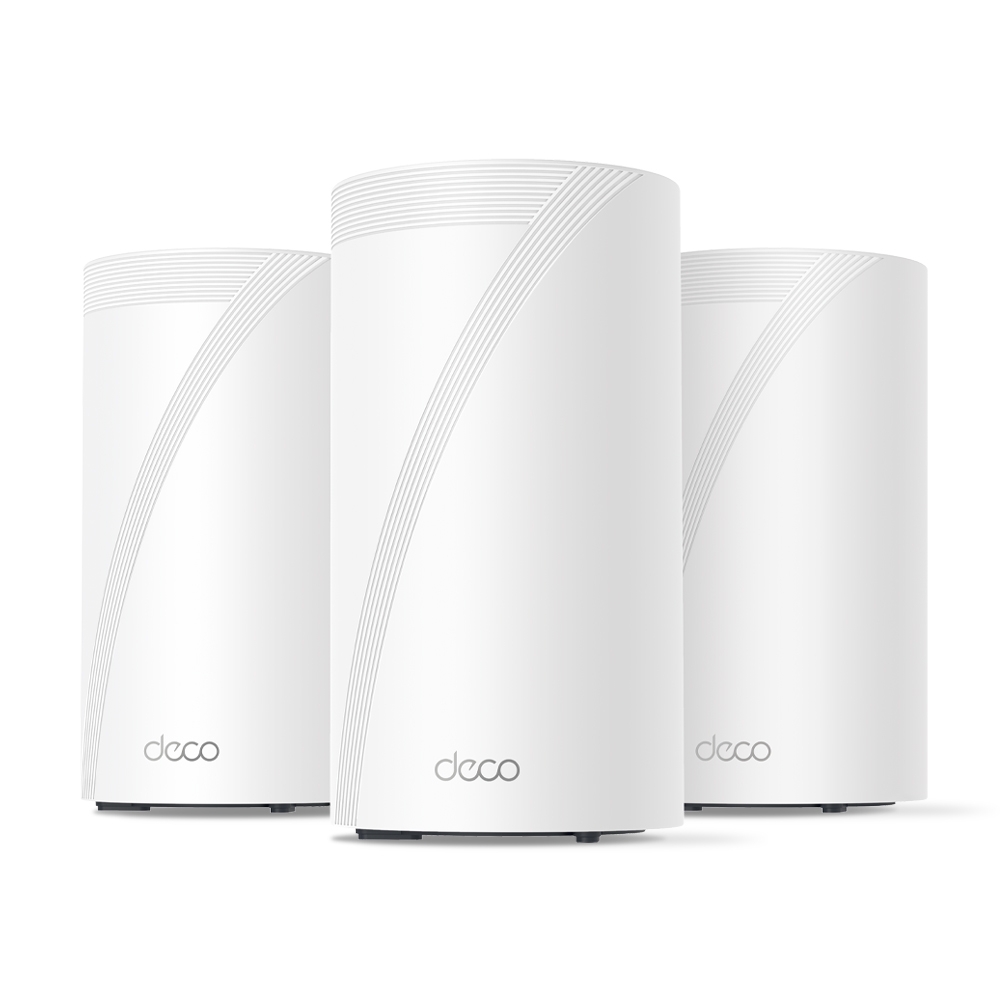
    When I upgraded to a detached home with 10G fibre, I wanted a mesh system that could actually keep up — without costing a fortune. After researching TP-Link’s full Wi-Fi 7 lineup, I settled on the BE85. This post breaks down what I learned comparing the BE63, BE75, BE85, and BE95 — and why the BE85 came out on top for my setup.

    Note: Some links in this post are affiliate links. If you buy something through them, I may earn a small commission — it doesn’t cost you anything extra, and it helps support the site. As an Amazon Associate, I earn from qualifying purchases.


    🚨 Limited-Time Deal: TP-Link Deco BE63 (3-Pack)

    Buy the TP-Link Deco BE63 (3-Pack) on Amazon →
    🟢 Deal Price: $398.99 (was $599) — Offer valid through July 11
    💳 Bonus: 25% back in Amazon Prime Card rewards (if applicable)

    🛜 BE10000 Tri-Band Wi-Fi 7 Speeds:

    • 5188 Mbps on 6 GHz
    • 4324 Mbps on 5 GHz
    • 574 Mbps on 2.4 GHz

    📦 What You Get: Covers up to 7,600 sq ft, supports 200+ devices, and includes 4× 2.5G LAN/WAN ports + 1× USB 3.0 port per unit.

    🧠 Features:

    • Simultaneous wired + wireless backhaul
    • AI-driven seamless roaming
    • Full backwards compatibility with any ISP or Wi-Fi generation

    Why I Went Mesh

    When I moved into a detached townhouse, one of my priorities was ensuring stable Wi-Fi coverage across all floors and rooms. Thick internal walls and a slightly larger footprint than a typical apartment made single-router setups unreliable — especially toward the edges of the house.

    Rather than run cables through walls or deal with signal dropouts, I opted for a mesh Wi-Fi solution. A multi-node system gave me full coverage with seamless handoffs between access points, eliminating dead zones and ensuring solid speeds everywhere from the bedroom to the garden.


    TP-Link BE Series Compared: BE63 vs BE75 vs BE85 vs BE95

    TP-Link’s Wi-Fi 7 mesh lineup (BE series) includes four main models: BE63, BE75, BE85, and BE95. While all support Wi-Fi 7, their specs and use cases differ significantly.

    🔹 TP-Link Deco BE63

    • Bands: Tri-band (2.4GHz + 5GHz + 6GHz)
    • Speeds: Up to 11Gbps combined
    • Ethernet:
    • 1× 2.5G WAN/LAN port
    • 3× 1G LAN ports
    • Coverage (2-pack): ~5,500 sq ft
    • Backhaul: Wireless only (no 10G or dedicated backhaul port)
    • Use Case: Budget Wi-Fi 7 for small to medium homes
    • Pros: Most affordable Wi-Fi 7 mesh option, good performance for the price
    • Cons: Lacks 10G ports, weaker wired backhaul support

    🔹 TP-Link Deco BE75

    • Bands: Tri-band (2.4GHz + 5GHz + 6GHz)
    • Speeds: Up to 17Gbps combined (11,530 Mbps on 6GHz, 4,324 Mbps on 5GHz, 688 Mbps on 2.4GHz)
    • Ethernet:
    • 1× 10G RJ45/SFP+ WAN/LAN combo port
    • 3× 2.5G WAN/LAN ports
    • Coverage (2-pack): ~6,000–6,300 sq ft
    • Backhaul: Supports simultaneous wired + wireless Multi-Link Operation (MLO)
    • Use Case: Mid-tier Wi‑Fi 7 mesh with flexible wired and wireless backhaul—great for users with multi-gig (up to 10G) internet but not requiring full BE85/BE95 performance.
    • Pros: Future-proof 10G port, strong throughput and coverage, 8‑stream Wi‑Fi 7
    • Cons: Only one 10Gbps port (others are 2.5G), no dedicated backhaul band

    🔹 TP-Link Deco BE85

    • Bands: Tri-band (2.4GHz + 5GHz + 6GHz)
    • Speeds: Up to 22Gbps combined
    • Ethernet:
    • 2× 10G ports (1× SFP+ combo, 1× RJ45)
    • 2× 2.5G LAN ports
    • Coverage (2-pack): ~9,600 sq ft
    • Backhaul: Supports 10G wired backhaul
    • Use Case: Large homes, power users, multi-device households
    • Pros: Great performance, future-proof ports, excellent coverage
    • Cons: Pricier than BE63/BE75 but offers much more

    🔹 TP-Link Deco BE95

    • Bands: Quad-band (2.4GHz + 5GHz-1 + 5GHz-2 + 6GHz)
    • Speeds: Up to 33Gbps combined
    • Ethernet:
    • 2× 10G ports
    • 2× 2.5G LAN ports
    • Coverage (2-pack): ~9,600–10,000 sq ft
    • Backhaul: Dedicated band for wireless backhaul + full 10G support
    • Use Case: Power users, wired smart homes, 2G/10G+ multi-gig setups
    • Pros: Absolute top-end performance, dedicated backhaul band, fastest speeds
    • Cons: Very expensive — overkill for most homes

    Why I Chose the TP-Link BE85

    After reviewing all the options, the BE85 hit the sweet spot for my needs. My ISP provides 10G fibre to the home, and I wanted to actually make use of it — not bottleneck it with a 1G router. The BE85 offered:

    • ✔ Full 10G WAN + LAN support
    • ✔ Fast, reliable tri-band Wi-Fi 7
    • ✔ Wired backhaul with 10G performance
    • ✔ Substantially lower cost than the BE95, without sacrificing much

    Another key reason I went with TP-Link over brands like Netgear, Asus, or Eero was price-to-performance. The BE85 delivers comparable (and in many cases better) real-world throughput and coverage than competing systems, while undercutting them significantly on cost. According to performance tests like those from Dong Knows Tech, the BE85 actually outperformed more expensive options — even the Netgear Orbi RBKE963 — in both speed and range.

    Combined with the ease of use, clean app, and rapid firmware support from TP-Link, it made the BE85 one of the best-value Wi-Fi 7 mesh systems available — and still one of the top performers months after release.


    Hands-On Impressions with the BE85

    From the moment I unboxed it, setup was quick and painless using the TP-Link Deco app. The two units synced easily, and firmware updates were done within minutes. Here’s how it’s performed over several months:

    🔹 Coverage & Range

    I get full signal across the house — no buffering, no dropouts. Even in the furthest room on the second floor, I still get over 1.5 Gbps download — most recently clocking in at 1567 Mbps down / 742 Mbps up via Speedtest.

    🔹 Speed Testing

    Using a wired backhaul and 6GHz-capable devices, I regularly see speeds over 1.5 Gbps. More impressively, I’ve tested the connection multiple times with my 10G fibre line and reached as high as 7.58 Gbps down / 7.39 Gbps up during off-peak hours.

    Even during peak usage times, I’ve seen 3.87 Gbps down / 1.64 Gbps up, which is still miles ahead of most home connections.

    🔹 Stability

    The system has been rock-solid. No node drops, no weird disconnects. I’ve only rebooted it once since installation — and that was due to a firmware update.

    🔹 App Control

    The Deco app is simple, but has most of what you need: device prioritisation, QoS, basic firewalling, guest network, and remote access.

    🔹 Downsides?

    Very few. It’s large compared to budget routers, and some advanced users might find the lack of granular settings (like VLAN tagging or deeper DHCP options) limiting — but for 99% of homes, it’s a premium experience.


    Should You Buy the BE63, BE75, BE85, or BE95?

    Choosing the right mesh system depends on your home size, internet speed, and how future-proof you want your setup to be. Here’s a quick guide based on everything covered:

    ✅ Go with the BE63 if:

    • You’re upgrading from an older Wi-Fi 5 or early Wi-Fi 6 setup
    • You want basic Wi-Fi 7 support at the lowest possible cost
    • Your home is small to medium-sized and you’re not using multi-gig internet

    Get the BE63 on Amazon →

    ✅ Consider the BE75 if:

    • You want more bandwidth and coverage than the BE63
    • You still don’t need 10G ports or wired backhaul
    • You’re in a medium to large home with many devices

    Get the BE75 on Amazon →

    ✅ Choose the BE85 if:

    • You have a multi-gig or 10G internet connection
    • You want wired backhaul support with 10G LAN/WAN
    • You plan to run NAS, streaming, cloud backups or a smart home with heavy traffic
    • You want premium performance without BE95 pricing

    Get the BE85 on Amazon →

    ✅ Go for the BE95 only if:

    • You absolutely need the best possible performance
    • You’re in a very large home or smart home ecosystem with dozens of demanding devices
    • You need quad-band Wi-Fi 7 and a dedicated wireless backhaul

    Get the BE95 on Amazon →


    Final Thoughts

    The TP-Link BE series offers something for everyone, but the BE85 stands out as the true sweet spot. It’s powerful enough to make full use of 10G internet, provides rock-solid mesh coverage, and still comes in far cheaper than flagship systems from other brands.

    For detached homes, users with demanding network setups, or anyone wanting to build around Wi-Fi 7 — this is one of the best options available.

    If you’re considering the BE63 as a budget-friendly alternative, it’s a solid pick too — just be aware of its backhaul and port limitations.

    Still deciding if Wi-Fi 7 is worth the leap? This breakdown of Wi-Fi 6, 6E, and 7 can help you figure out what’s best for your setup.