Tag: UPS

  • UGREEN US3000 UPS Review – The Perfect NASync Companion

    UGREEN US3000 UPS Review – The Perfect NASync Companion

    Disclosure: As an Amazon Associate, I earn from qualifying purchases. Some links in this article may be affiliate links, which help support the site at no extra cost to you.


    Introduction

    After a week of daily use, the UGREEN US3000 UPS has already proven why it exists. Power protection isn’t glamorous, but even a short outage can corrupt drives or interrupt critical writes on a NAS.

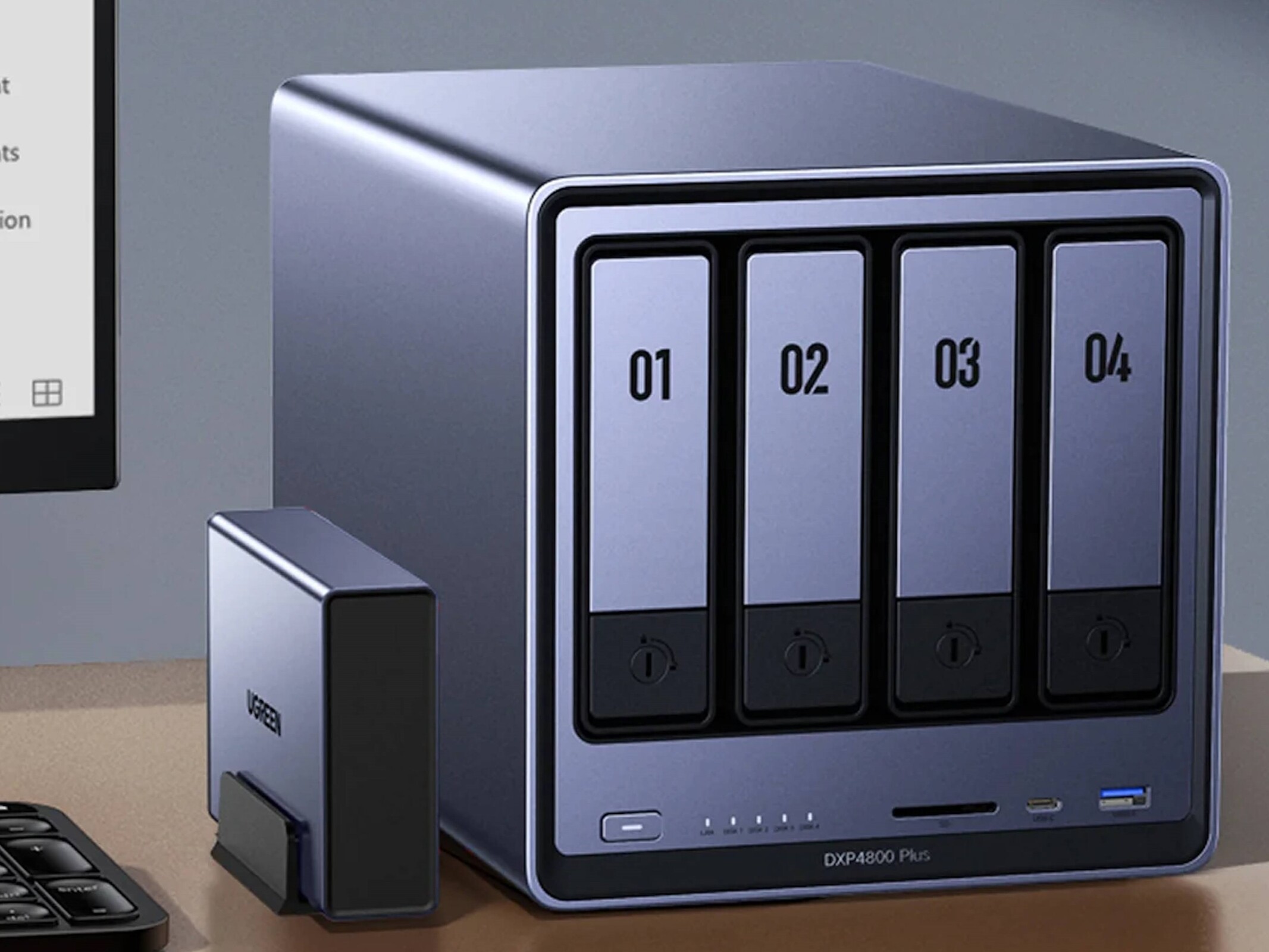
    UGREEN designed the US3000 to prevent that exact risk — not by adding complexity, but by integrating power management directly into UGOS Pro, the same operating system used in the NASync series. (If you want to see how it performs in practice, read my UGREEN NASync DXP2800 two-month review for a deeper look at daily reliability and real-world performance.)

    Unlike most universal UPS units that rely on dated software and manual setup, this compact model is purpose-built for NASync devices. It feels more like a built-in safeguard than an accessory — quietly doing its job in the background.


    Design and Build Quality

    The US3000 is constructed from solid aluminium alloy, finished in the same matte silver-grey as the DXP-series NAS units. It’s small (120 × 80 × 30 mm, 440 g) yet dense, with precise machining and no flex.

    Inside, it houses a 12 000 mAh (43.2 Wh) battery pack made from four SunPower INR18650-3000 cells wired in series. Dedicated circuitry manages charging, discharge rate, and temperature control, while the metal enclosure doubles as a passive heatsink.

    The internal layout is clean and practical: foam-cushioned cells, Mylar-insulated wiring, and reinforced connectors. The supplied DC5525 and USB-C cables are short and tidy — ideal for rack or shelf setups. It’s clear UGREEN designed this as a true companion for its NAS line rather than a generic UPS.


    Setup and Integration with NASync

    Setup takes under five minutes. Connect the US3000 between your NAS and its power supply using the DC5525 lead, then attach the USB-C cable.

    Once powered, UGOS Pro detects the UPS automatically under Control Panel → Hardware & Power → UPS. From there you can view charge status, voltage, and shutdown options — all without installing drivers or third-party software.

    That seamless integration is what separates it from typical UPS units. The US3000 appears in UGOS Pro as a managed device, enabling automatic shutdown and recovery when power returns.

    If you’re just starting out with your NASync, my beginner setup guide for the UGREEN DXP2800 covers this interface step by step.


    Performance and Everyday Use

    The US3000 focuses on one thing: controlled shutdowns. It’s not a long-duration backup — it’s protection done right.

    UGOS Pro offers two response modes:

    1. Standby Mode

    • NAS continues running on battery during an outage.

    • If mains returns quickly, it resumes seamlessly.

    • If power doesn’t return, the NAS shuts down gracefully before the battery is depleted.

    2. Auto Shutdown

    • NAS immediately begins its shutdown sequence.

    • Services stop cleanly and drives park safely.

    • Once power is restored, it restarts automatically.

    I keep mine set to Auto Shutdown — it’s the safest option for unattended use. In testing, both modes worked perfectly. The DXP2800 switched instantly to UPS power and completed its shutdown sequence cleanly, with zero voltage fluctuation.

    Recharge takes about two hours, and because it uses DC-to-DC conversion instead of AC inversion, it runs completely silent and highly efficient.

    If you’d like to see how the DXP2800 performs under typical workloads, the two-month NASync review includes real-world tests on transfer speeds, app stability, and power use.


    Compatibility and Runtime Estimates

    Runtime figures from NASCompares, ChargerLab, and UGREEN show the UPS is tuned for short, controlled operation.

    NAS ModelCPUMax DrawEst. Runtime
    DXP2800Intel N100≈ 35 W≈ 10 min
    DXP4800Intel N95≈ 45 W≈ 8–9 min
    DXP4800 PlusIntel Core i3-N305≈ 55 W≈ 7 min
    DXP8800 PlusIntel Core i5-1235U≈ 70 W≈ 6 min
    DH2600 / DX4600Various< 50 W≈ 8–9 min

    Rated for 120 W DC output (12 V / 10 A, 19 V / 7.9 A, 20 V / 7 A), it easily handles every NASync model. No configuration is needed — UGOS Pro manages detection and shutdown automatically.

    For context on how drive selection affects power usage, see Choosing the Best Drives for Your NAS – HDD vs SSD Recommendations.


    Inside the US3000 (Teardown Insights)

    ChargerLab’s full teardown of the UGREEN 120 W DC UPS shows just how well built this unit is.

    It uses a Chipsea CBM8580KV6NT for battery management and SMBus communication, a Texas Instruments TPS55289 for buck-boost power regulation, and a GigaDevice GD32F303RCT6 microcontroller (Cortex-M4 @ 120 MHz) for logic and protection.

    Each of the four battery cells is individually insulated and cushioned, while the PCB is shielded with Mylar and protected by dual fuses and thermistors. Wiring is reinforced, neatly routed, and the aluminium chassis itself acts as a heatsink.

    It’s a compact, efficient design that would look right at home in professional-grade hardware.


    Highlights

    • Native integration – Full hardware-software link through UGOS Pro; zero configuration.

    • Smart behaviour – Automatic standby and shutdown for controlled response.

    • Premium build – Machined aluminium shell, insulated internals, efficient cooling.

    • Power efficiency – DC-to-DC conversion for silent, stable operation.

    • Effortless ownership – Quick recharge, no maintenance, seamless protection.

    If you’re exploring ways to make your NAS more versatile, try Top 10 Docker Containers to Supercharge Your NAS — it’s packed with apps that complement a NASync setup perfectly.


    Limitations

    • Runtime – ≈ 43 Wh battery provides 6–10 minutes of backup; enough for graceful shutdowns, not long-term use.

    • Device scope – Exclusive to UGREEN NASync systems.

    • Availability – Still limited in retail channels but expected to expand soon.

    For users wanting both on-site and off-site protection, pair this with Automated NAS Backup to Azure via Rclone Guide to create a full-stack backup strategy.


    Final Verdict

    After a week of use, the UGREEN US3000 UPS has become one of those accessories you forget about — until it saves your data. It’s compact, silent, efficient, and integrated so tightly with UGOS Pro that it feels like part of the NAS itself.

    It won’t keep your system running forever, but it ensures it never shuts down the wrong way — and for NAS owners, that’s what really matters.

    If you’re building or upgrading a NASync setup, the two-month UGREEN DXP2800 review offers detailed insights into everyday use and performance, while Best Home Security Cameras for Your NAS (Cloud vs PoE) covers surveillance options that pair perfectly with this UPS.
  • UGREEN U3000 UPS First Look — Small but Mighty

    UGREEN U3000 UPS First Look — Small but Mighty

    The wait is finally over — my UGREEN U3000 UPS has arrived!

    Right out of the box, I was caught off guard by its size. It’s unbelievably compact — almost the same footprint as my UGREEN Magnetic Power Bank, which makes it feel more like a portable charger than a full UPS system.

    This little unit is designed specifically for UGREEN’s NASync lineup, offering 120W of DC backup power with zero-second transfer time. That means if the power cuts out, your NAS keeps running instantly with no delay.

    It’s a clean, modern take on backup power — no bulky fans, no heavy lead-acid batteries, and no cluttered cabling. Just a sleek matte black box that slots quietly beside your NAS.

    I’ve just got it set up with my UGREEN NASync DXP2800, and here’s a quick look at the hardware, the software integration, and why this might be one of the smartest little UPS units around.


    Unboxing & First Impressions

    UGREEN U3000 UPS packaging showing 120W DC backup design.
    Simple, clean packaging that sets the tone for UGREEN’s minimalist design approach

    The box presentation is classic UGREEN — understated and premium. Even before opening it, you get the sense that this is designed to fit neatly into a modern setup rather than dominate it.


    Compact Design

    UGREEN U3000 UPS on desk showing its compact matte finish.
    The matte finish and solid build make it feel far more premium than its size suggests.

    Once unboxed, the size difference really stands out. When placed next to my UGREEN Magnetic Power Bank, they’re nearly identical in dimensions. Seeing them side by side drives home just how compact this UPS truly is — it’s impressive that something this small can output 120W of continuous power.

    UGREEN U3000 UPS compared with UGREEN Magnetic Power Bank.
    Almost pocket-sized — the U3000 looks more like a power bank than a UPS.

    Ports & Connectivity

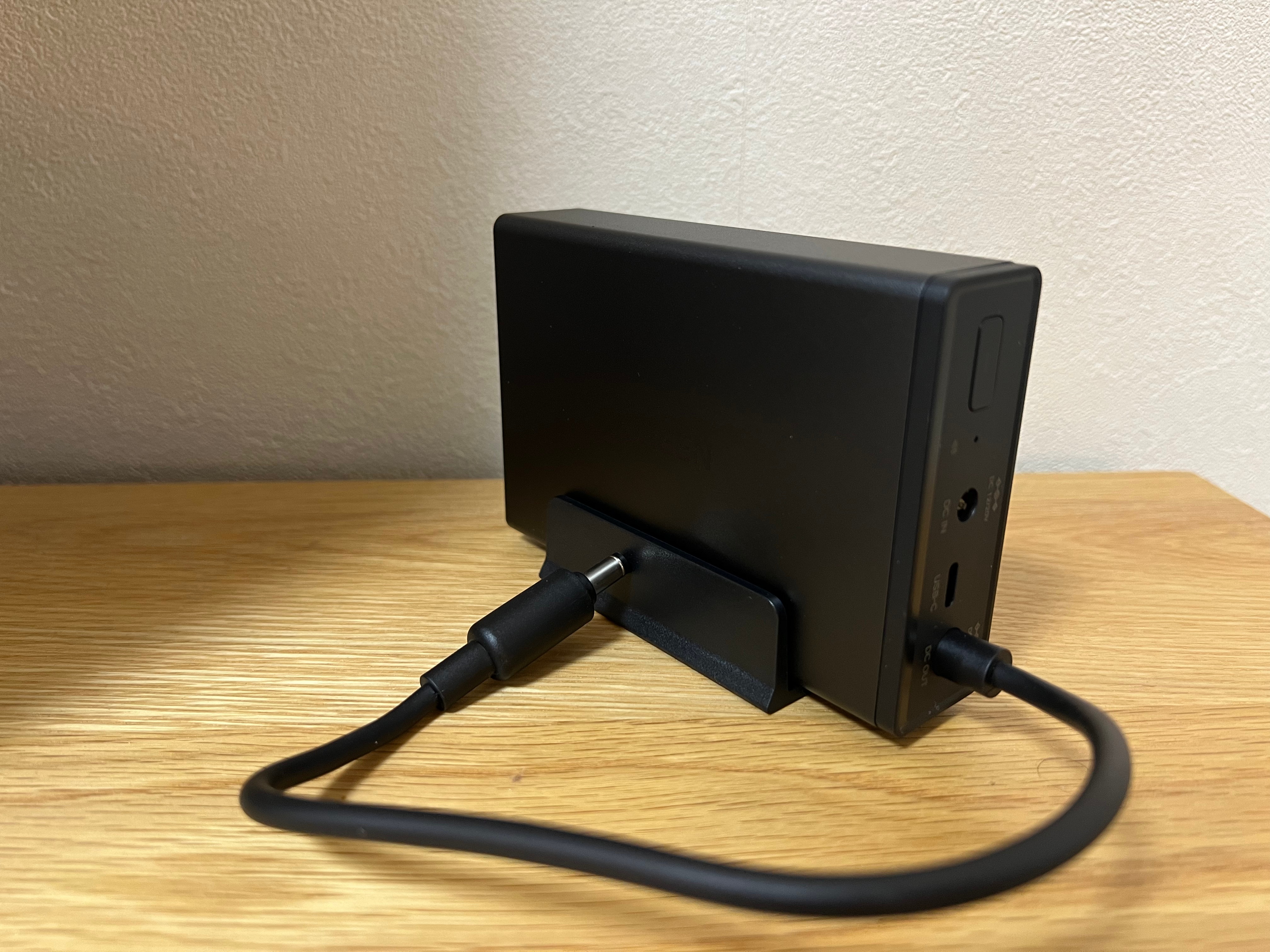
    Close-up of UGREEN U3000 UPS rear ports including DC IN, DC OUT, and USB-C
    Straightforward port layout — DC IN, DC OUT, and USB-C for monitoring.

    The rear layout is clean and functional, featuring DC input/output and a USB-C port for communication. It runs silently and uses passive cooling, which is a welcome change from traditional UPS fans humming in the background.


    Smart Integration

    PC control panel view of UGREEN US3000 UPS showing connection status, firmware version, and NUT options.
    The U3000 is recognised instantly through the NAS interface with full NUT support.

    Connecting the U3000 to the NAS was completely plug-and-play. It appeared right away under the UPS settings as UGREEN US3000, showing battery capacity, firmware version, and auto-shutdown options.

    The UPS also supports NUT (Network UPS Tools) — an open-source protocol that allows the NAS to detect power changes and automatically shut down safely if the battery runs low. It’s a small but important addition that makes the system much more reliable in real-world conditions.


    Next Steps

    Over the next few days, I’ll see how the U3000 performs under normal NAS workloads — how quickly it switches to battery, how stable it runs during short outages, and how the NUT integration behaves over extended use.

    If you are building out your NAS, check my guide Choosing the Best Drives for Your NAS Setup and my roundup NAS Compatible Security Cameras to see how it all fits together.

    Stay tuned — this compact little unit might be one of the best NAS accessories UGREEN has released so far.

  • Keeping Your Smart Home Online: Best Power & Backup Solutions for 2025

    Keeping Your Smart Home Online: Best Power & Backup Solutions for 2025

    Smart homes thrive on reliability. From your NAS storing critical data to your cameras keeping watch and your router connecting it all, everything depends on uninterrupted electricity. Yet power cuts, surges, or even short flickers can disrupt your entire setup — leaving you without security, access, or data integrity.

    The good news is there are straightforward ways to protect your system. Let’s break down the best options, from simple surge protectors to whole-home backup systems.

    💡 Disclosure: This post contains affiliate links. If you buy through these links, I may earn a commission at no extra cost to you. This helps support the blog and keeps content free.


    Why Power Protection Matters for Smart Homes

    A smart home without power is just a house full of expensive devices. Sudden outages can:

    • Corrupt data on your NAS or RAID array
    • Interrupt camera recording and leave blind spots
    • Drop your internet connection, cutting you off from alerts or remote access
    • Reset devices mid-update, sometimes causing configuration errors

    Even short interruptions can create frustration or trigger costly rebuilds. That’s why building in layers of power protection is so important.

    👉 If you’re new to NAS setups, check out my Beginner’s Guide to Setting Up the UGREEN NASync, which shows how I built the base of my smart home.


    Types of Power Protection

    1. Surge Protectors – Affordable First Line of Defence

    The entry-level option but still critical. A surge protector shields your equipment from voltage spikes caused by lightning strikes, faulty wiring, or grid instability. Without one, a single surge could fry your NAS or router.

    What to look for:

    • Joule rating: Higher is better. Aim for at least 2000 joules for electronics like NAS units or routers.
    • Status indicators: Good models have a light or alert to tell you if protection is still active.
    • Form factor: Choose between power strips (flexible) or wall-mounted units (tidier for smaller setups).

    Popular brands: Belkin, APC, Anker. These companies offer reliable surge protection for smart home gear at accessible prices.

    View Surge Protectors on Amazon

    A surge protector is the simplest way to shield smart home devices from damaging power spikes.

    2. UPS (Uninterruptible Power Supply) – Instant Protection

    A UPS is the first real step toward resilience. It provides instant failover power using an internal battery, so your devices never actually see the power drop. Think of it as a short-term safety net.

    Common types:

    • Standby UPS – basic, designed for small loads like routers and modems.
    • Line-interactive UPS – balances cost and performance, great for NAS devices and small servers. They regulate voltage as well as provide battery backup.
    • Online/double-conversion UPS – professional-grade, converting incoming AC to DC and back again, delivering clean and stable power continuously. Ideal for heavier smart home labs.

    Popular brands: APC and CyberPower are widely used for home and small office setups, with options ranging from budget-friendly to advanced models with software integration.

    View UPS Options on Amazon

    💡 Example: Running a NAS behind a line‑interactive UPS gives you 20–60 minutes of runtime, enough to trigger auto‑shutdown or ride out short outages. For more on how the NAS fits into my day‑to‑day setup and workflows, see my 2‑Month Review of the UGREEN NASync.

    A UPS provides instant backup, keeping your NAS and router online during short outages.

    3. Portable Power Stations – Flexible Extended Runtime

    Portable power stations look like large battery packs, but unlike a UPS, they don’t provide seamless switchover. If the power cuts, your devices will turn off unless you manually connect them to the station. They’re best seen as extended runtime solutions for longer blackouts.

    Where they shine is flexibility. Many manufacturers now offer robust options that can also integrate with solar panels for emergency recharging:

    • Anker – The SOLIX range includes compact and heavy-duty stations, some even supporting EV charging. Anker is known for reliability, sleek design, and good warranty support, making them a safe choice for newcomers.
    • EcoFlow – Recognised for modular systems and excellent solar integration. Their fast-charging batteries and intuitive apps make EcoFlow ideal if you want portability and speed when recharging.
    • Bluetti – A favourite for large capacity and modular expandability. Often chosen by users who need long runtimes or semi-permanent backup solutions for home labs and smart homes.
    • Jackery – A market leader in portable stations, particularly their solar generator kits. Jackery units are beginner-friendly, simple to set up, and pair well with solar panels for off-grid or emergency use.

    These brands provide models at different capacities, from a few kWh to much larger setups. The right one depends on how long you need to run your devices and what you want to keep powered.

    Portable power stations give hours of runtime and can recharge from solar, making them ideal for longer outage

    4. Whole-Home Battery Storage – Ultimate Resilience

    If you want complete resilience, whole-home systems keep everything running seamlessly, not just select devices.

    • Anker SOLIX X1 – Modular from 5 kWh to 180 kWh, solar-ready, with ultra-fast 20 ms switchover.
    • Tesla Powerwall 2 – 13.5 kWh per unit, stackable, widely available, integrates tightly with solar setups.
    • LG Chem RESU – Compact home battery solution, popular in solar installations.

    These options are expensive, but they ensure your smart home, security, and even EV charging continue uninterrupted during extended blackouts.

    Whole-home battery systems like the Anker SOLIX X1 provide seamless backup for your entire house.

    👉 Curious about how this ties into broader smart home resilience? My post on AI Transforming Smart Homes in 2025 shows how AI plus reliable power makes automation much more effective.


    How Much Backup Do You Need?

    It’s easy to overestimate. Think about what you actually need alive during an outage:

    • Small setups (NAS + router + PoE switch): under 200 W. A basic 600–850 VA UPS will keep this alive for 20–30 minutes. Just enough for safe shutdowns.
    • Medium setups (add servers, hubs, multiple cameras): 1000–1500 VA UPS is better. Expect 30–60 minutes depending on load.
    • Larger setups (multi-camera security, home lab equipment): consider 2000 VA+ UPS or a portable power station for several hours runtime.
    • Whole-home resilience: if you want lights, heating/cooling, and appliances powered too, only a home battery system like Tesla Powerwall or Anker SOLIX X1 will cut it. These deliver many hours, even days, of backup depending on size and load.

    💡 Pro tip: Check the wattage of each device (often listed on power bricks). Add them up, then pick a backup option that supports at least 20–30% more capacity than you need.


    Challenges & Trade-Offs

    No solution is perfect, and it’s worth knowing the downsides before you invest:

    • Surge Protectors – Cheap but not foolproof. They wear out over time (joule capacity is finite), so they need replacing every few years.
    • UPS systems – Excellent for seamless protection, but the internal batteries degrade and usually need replacement every 3–5 years. Runtime is limited — they’re for short interruptions, not long blackouts.
    • Portable Power Stations – Offer flexibility and long runtime, but no automatic failover. You’ll need to switch devices manually when power goes out. They’re also heavier and pricier than a basic UPS.
    • Whole-Home Batteries – The gold standard, but very expensive and often require professional installation. They also take up space and may need integration with solar for best results.

    Understanding these trade-offs helps you pick the solution that fits both your budget and your actual needs.


    Final Thoughts

    Power is the weakest link in most smart homes. You can have the best NAS, the most advanced cameras, and perfectly tuned Wi-Fi, but when electricity drops, it all collapses.

    The good news? You don’t have to spend thousands right away. Start small with a surge protector and a UPS for your router and NAS. If resilience matters more, expand into portable power stations with solar charging, or go all-in with whole-home battery storage.

    👉 If you’re planning upgrades, visit my Recommended Gear page where I’ll be adding UPS, surge protection, and backup solutions. Because a smart home should be reliable — even when the lights go out.

    💬 What are you using to keep your smart home online? Would you stick with a UPS or go all-in on a whole-home system? Share your setup in the comments — your tips might help someone else build a more resilient home!


    Image Credits:

    • Surge Protector: Geeni (official product image)
    • UPS: APC (Smart-UPS product line)
    • Portable Power Stations: Anker, EcoFlow, Bluetti, Jackery (official product photos)
    • Whole-Home Battery: Anker SOLIX X1 (official press image)