Disclosure: As an Amazon Associate I earn from qualifying purchases. Links to products in this article may be affiliate links, which help support the site at no extra cost to you.
My Intel i7-8700K and RTX 3080 have served me incredibly well. For years this setup has handled everything I’ve thrown at it, but seven years on the cracks are starting to show. Newer titles are pushing CPU performance harder, memory standards have moved on, and even cooling has evolved to free up space and improve aesthetics.
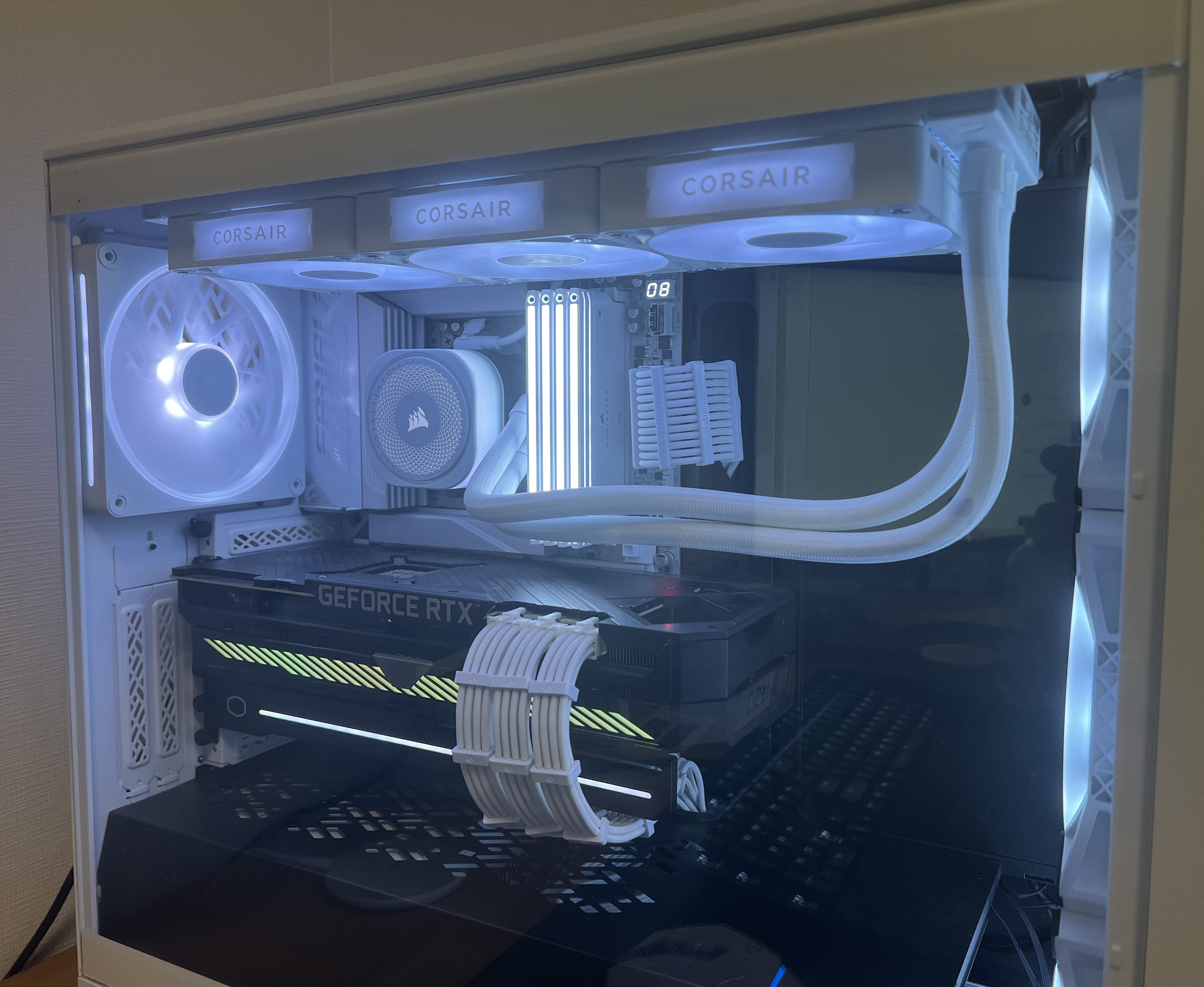
I’m not scrapping everything — my Fractal Design Meshify 2 case is staying. It has excellent airflow, radiator support, and plenty of room for upgrades. My Corsair RM1000x SHIFT PSU now powers the build, replacing my older RM850x. I also decided to keep my ROG STRIX RTX 3080 10G, my SSDs, and add in new fans. The heart of the system — CPU, motherboard, memory, cooler — is where the biggest changes happened.
CPU – Ryzen 7 7800X3D (Best Value Choice)
When it came to the CPU, my shortlist was between AMD’s 7800X3D and the 9800X3D. On paper, the 9800X3D does have an edge — around a 10% uplift in gaming benchmarks thanks to slightly higher clocks and efficiency. The catch? It costs around 50% more. That kind of price-to-performance ratio just didn’t make sense for me.
Specs at a glance: 8 cores / 16 threads · 4.2 GHz base · up to 5.0 GHz boost · 96 MB L3 3D V-Cache · 120 W TDP
Performance in context:
- The 7800X3D regularly tops gaming benchmarks, often beating Intel’s Core i7-14700K while running cooler and more efficiently.
- It competes closely with the i9-14900K in cache-sensitive games.
- Compared to the 9800X3D, you lose around 10% in FPS but save a massive chunk of budget.
Regional pricing: In my region, the 7800X3D is consistently the cheaper option, making it a far better value pick. Amazon.com doesn’t currently stock it, but if the 9800X3D were available at a similar price, it would become a no-brainer upgrade thanks to its small but measurable performance lead.
For a build focused purely on gaming, the 7800X3D offered exactly what I needed: high frame rates, low power draw, and long-term relevance on the AM5 platform — without overspending.

The Ryzen 7 7800X3D remains the best value gaming CPU thanks to its 3D V-Cache advantage.
Motherboard – Gigabyte X870E AORUS ELITE X ICE
Motherboards are the backbone of any build, and I wanted something both technically future-proof and visually aligned with my white theme. That led me to the Gigabyte X870E AORUS ELITE X ICE.
Key Features & Connectivity:
- Chipset & Socket: AMD X870E with AM5 socket (supporting Ryzen 7000, 8000, and future CPUs).
- VRM & Power: Twin-Digital 16+2+2 phase VRM design for stable power delivery.
- Memory Support: 4 × DIMM DDR5 slots with EXPO/XMP support (beyond DDR5-6000).
- Storage: 4 × M.2 slots (2 × PCIe 5.0, 2 × PCIe 4.0) + 4 × SATA III ports.
- Expansion: 1 × PCIe 5.0 x16 slot for GPU + extra PCIe 4.0 slots.
- USB: Dual USB4 Type-C ports (rear), multiple USB 3.2 Gen2/Gen1 Type-A, USB-C front header, plus USB2.0 headers.
- Networking: Built-in Wi-Fi 7 and Bluetooth + 2.5 GbE LAN.
- Audio: Realtek ALC codec, 7.1-channel support, S/PDIF out.
- Extras: BIOS Flashback, debug LEDs, EZ-Latch for GPU/M.2 installation.
Why it mattered for my build:
- Future-proofing: PCIe 5.0 across GPU and storage, with ample M.2 slots.
- Network synergy: Wi-Fi 7 integrates perfectly with my TP-Link BE85 Wi-Fi 7 system. 👉 My BE85 review.
- Design: ICE edition’s white heatsinks and accents match the build theme.
- Stability: Strong VRM ensures reliable performance now and headroom for future CPUs.

Gigabyte’s X870E AORUS ELITE X ICE motherboard combines PCIe 5.0, Wi-Fi 7, and a clean white design.
Memory – Corsair Dominator Titanium RGB DDR5-6000 (32GB, White)
I chose the Corsair Dominator Titanium DDR5-6000 CL30 kit (2×16 GB). It wasn’t just an aesthetic choice — though the white finish and RGB fit the build theme perfectly — it’s also technically one of the best fits for AMD’s AM5 platform.
Specs at a glance: 32 GB (2×16 GB) · DDR5-6000 MT/s · CL30 (30-36-36-76) · 1.40 V
Why DDR5-6000 CL30 matters:
- AMD’s AM5 platform performs best at DDR5-6000 (1:1 sync with Infinity Fabric).
- CL30 keeps latency low, making it faster than looser kits at the same speed.
- DDR5-6400+ kits exist, but gaming gains are negligible while prices climb.
32 GB is the new gaming standard — plenty for today and safe for the future, without wasting money on 64 GB.

Corsair Dominator Titanium DDR5-6000 CL30 RAM – fast, low-latency memory tuned for AMD AM5 systems.
Storage – Current Drives + Upgrade Plan
Kept drives:
- Samsung 970 Evo (NVMe Gen3)
- Samsung 980 (NVMe Gen3)
- Samsung 860 Evo (SATA SSD)
These remain fast and reliable. Windows boots instantly, games load quickly, and daily use is smooth.
Planned additions:
- PCIe 4.0 NVMe: Affordable, mature, and ideal for gaming.
- PCIe 5.0 NVMe: Higher sequential speeds, but costly and runs hotter. Worth it only if prices drop or use cases expand.
Comparison: PCIe 3.0 vs 4.0 shows little difference in gaming load times, but 4.0 is much faster for transfers. PCIe 5.0 is mostly bragging rights right now.
Cooling – Corsair iCUE Link TITAN 360 RX (White)
Leaving behind the Noctua NH-D15 wasn’t easy. It’s still one of the best air coolers ever made. But for this build, aesthetics and clearance mattered too.
Specs at a glance: 360 mm radiator · RX120 RGB fans · Pump block w/ LCD · iCUE Link Hub included
Why I switched:
- Performance: Plenty of thermal headroom for the 7800X3D.
- Design: Frees space around CPU/RAM, showcasing components.
- Integration: Syncs seamlessly with Corsair iCUE and my new fans.
Trade-offs:
- AIO fans spin up more often, so noise is more noticeable vs air.
- Lifespan is shorter than legendary air coolers like the NH-D15.
Still, I’m happy: temps are lower, aesthetics are cleaner, and it matches the white build.

Corsair LX140 RGB fans simplify cable management thanks to iCUE Link daisy-chain connectivity.
PSU – Corsair RM1000x SHIFT
My old RM850x was solid, but it lacked PCIe connectors for future GPUs. The RM1000x SHIFT solved this.
Specs at a glance: 1000 W · ATX 3.0 · 80 Plus Gold · Fully modular · Side-mounted connectors · Native 12VHPWR
Why it works:
- Side-Mounted Connectors: Huge cable-management upgrade.
- ATX 3.0 & 12VHPWR: Ready for next-gen GPUs.
- Headroom: 1000 W ensures future GPU compatibility.
- Efficiency: Gold-rated — cool and reliable.
I originally wanted the Seasonic Vertex in white, but since it’s not available here, the SHIFT was the smarter choice.

Corsair RM1000x SHIFT White PSU – a fully modular, ATX 3.0-ready power supply designed for next-gen GPUs and clean cable management.
Fans – Corsair iCUE Link LX140
This turned out to be one of the most satisfying upgrades.
Why:
- Old setup: Corsair QL series required 2 cables per fan. With 4 fans, that meant 8 cables — cable management hell.
- New setup: LX140 daisy-chains, reducing clutter to a single cable run.
- Looks: White with subtle RGB fits the theme.
- Integration: Full iCUE support for easy lighting and curve control.
It made building far simpler and cleaner.

Corsair LX140 RGB fans simplify cable management thanks to iCUE Link daisy-chain connectivity.
GPU – Waiting for the Right Time
For now, I’m sticking with my ROG Strix RTX 3080, which still handles 1440p and even 4K with tweaks. But I’m keeping an eye on Black Friday and New Year sales for a potential upgrade.

ASUS ROG Strix RTX 3080 – still a powerhouse for 1440p and 4K gaming in 2025.
Specs at a glance (RTX 3080): 8704 CUDA cores · 10 GB GDDR6X · Boost ~1.7 GHz · 320 W TDP
Comparison: The RTX 3080 still trades blows with the RTX 4070 Ti in many games at 1440p, though it falls behind in ray tracing and efficiency. The next-gen Zotac RTX 5080 Solid (White) would deliver a huge uplift in ray tracing, DLSS, and raw power — but for now, the 3080 is more than capable for my needs.

Zotac RTX 5080 Solid White – a next-gen GPU designed for high performance and striking aesthetics.
Real-World 1440p Benchmarks (RTX 3080)
| Game | Settings (1440p) | RTX 3080 Performance |
|---|---|---|
| Marvel’s Spider-Man 2 (2025) | Max / RT Off | ~65 FPS avg (DLSS Quality recommended for smooth frametimes) |
| Horizon Forbidden West (2024) | Max | Mid-50s FPS (DLSS Quality lifts above 60) |
| Alan Wake II (2023–24) | Max / RT Off | Smooth with DLSS Quality, dips below 60 without it |
| Starfield (2023–24) | High | ~70–90 FPS, similar to RTX 4070 |
| Flight Simulator 2024 | Ultra | ~50–60 FPS in real-world flights |
| Battlefield 6 (2025) | Ultra + DLSS 4 Quality | ~90–120 FPS on newer maps |
| Borderlands 4 (2025) | Max | Low-60s FPS native, 70+ with DLSS |
Wrap-Up
What started as a CPU upgrade turned into a full platform refresh. Between the motherboard, cooling, PSU, fans, and memory, this build has evolved into a proper all-white showcase that’s both powerful and clean.
The 7800X3D gives me gaming performance that rivals the very best, the X870E ICE motherboard sets me up for years of upgrades, and the Corsair ecosystem ties it all together visually and functionally.
The GPU will be the final piece of the puzzle, but until then, this build is exactly what I wanted: powerful, efficient, and tailored to my style.
Up Next
To round things out, I’ve also ordered the UGREEN US3000 NAS UPS for my DXP2800. Power stability is just as important as raw performance, so I’m curious to see how it performs in everyday use. Once it arrives and I’ve had time to test it, I’ll share a detailed review — covering setup, integration, and whether it’s a worthwhile addition to a home NAS environment.
Leave a Reply